On this page
- Pick a duels plugin that fits your Minecraft version
- Duels Optimised
- Duels (Realizedd)
- AsDuels
- Duels (JGJ52)
- Install the plugin and restart
- Get an arena: build your own or paste a pack
- Create the arena and set both spawn points
- Save a kit and tie it to a queue
- Add queue signs players can click
- Reset the arena after each match
- Test before you open the queue
Key takeaways
5- Pick the duel plugin by your Minecraft version first: Duels Optimised lists 1.14 to 26.3, AsDuels needs 1.21.4 and Java 21.
- The core setup is /duels create, /duels set 1 and 2, /duels savekit and /duels addsign, but check your fork's docs.
- A duels plugin has no maps, so paste a schematic or world folder, then protect it with WorldGuard.
- Decide how arenas reset: block-free kits, AsDuels cleanup or a regeneration extension.
- Test with two accounts and back up before opening the queue.
This guide is for owners who want a 1v1 duels mode on a Paper or Spigot server. By the end you will have picked a duel plugin, installed it, loaded an arena, saved a kit and put up a queue sign players can click.
Pick a duels plugin that fits your Minecraft version
Here are four duel plugins worth a look. They differ mainly in which Minecraft versions they list and what else they need. Check the version your server runs before you compare features.
| Plugin | Versions and software it lists | Needs | Free or paid |
|---|---|---|---|
| Duels Optimised | Java 1.14 to 26.3 on Bukkit, Folia, Paper, Purpur and Spigot | Supports WorldGuard DuelZones; extensions are optional | Free |
| Duels (Realizedd) | Spigot, tested 1.8 to 1.19 on its listing | WorldGuard and PlaceholderAPI are supported | Free |
| AsDuels | Paper or Spigot 1.21.4, Java 21 or newer | No external dependencies | Free |
| Duels (JGJ52) | Java 1.21.x on Bukkit and Paper | WorldEdit and WorldGuard | GPL-licensed |
Duels Optimised
Duels Optimised is a fork of the original Duels plugin. Its listing mentions per-player kit editors, team queues from 2v2 upwards, party duels, round-based matches, a boxing mode, Elo rankings, item and money betting, spectator mode and Folia support. It also has an extension system: you drop extensions into plugins/Duels/extensions/. Modrinth shows about 98.8K downloads and three add-ons, for leaderboards, arena regeneration and parties.
It is a good fit if you want a full KitPvP or practice feature set and run a recent version. The setup is bigger than the others, so expect more menus and options to learn. The project links its docs at meteordevelopments.comSource site.
Duels (Realizedd)
The original. It has a long-running wiki covering commands, permissions, placeholders, extensions and an FAQ, plus queue signs, Elo ratings and WorldGuard support. Its SpigotMC listing says it is tested from 1.8 to 1.19, so it suits older servers best. If you run something newer, test it on a copy first or use one of the others.
AsDuels
AsDuels is the lightweight option. It has no external dependencies and stores data in YAML. Admins create arenas in game with a wand (/ad wand) and save kits with /ad kit save. Players get chat buttons to accept or deny challenges and a kit selector that shows live player counts. Its page says original arena blocks are protected and blocks players place are cleaned up after matches, which is handy for sumo or block-based modes. Note the Java 21 requirement.

Duels (JGJ52)
A small GPL-licensed plugin for 1.21.x on Paper. Admins make arenas from a WorldEdit selection, with a configurable spawn distance and countdown, and create kits from their inventory with /kit create. Players challenge each other through a kit menu or a queue. Permissions follow the duels.command.<command> pattern. Because it requires WorldEdit and WorldGuard, it works well if you already run both.
If you want a full practice core with ranked queues instead of a single duel plugin, see our comparison of five practice cores.
Install the plugin and restart
Download the plugin jar from its official page, then follow the steps for how your server runs.
- Upload the jar to your server's
pluginsfolder with SFTP orscp. - Restart the server, or stop and start it from your service manager.
- Watch the console for a line showing the plugin enabled and no errors.
- Open File Manager, go into the
pluginsfolder and use Upload (or SFTP) to add the jar. - Go to Console and press Restart.
- If the plugin needs a newer Java than your server has, open the Startup tab and pick a newer Docker image. If none is offered, ask your host.
- Open the Files / FTP page and upload the jar into
plugins. - Restart from the console page.
- Java is chosen by the host, so ask them if a plugin needs a version you do not have.
Get an arena: build your own or paste a pack
A duels plugin only handles the match logic. You still need a map with two spawn points. A good duel arena is small enough that players meet quickly, has some cover, and has no way to leave the playable area.
You can build one in a creative world, or paste a ready-made schematic. Our guide to loading and pasting schematics with WorldEdit covers where to upload files and how to undo a bad paste.
One ready-made option is PvP Arenas | x16 Maps, made by our team. It is a pack of 16 themed PvP arenas meant for practice, FFA, duels, KitPvP and team PvP. Themes include a forest with rivers, a cherry blossom garden, a crystal cavern, a desert with a hive, cobweb ruins, an ice river, a mushroom swamp, a nether lava arena and a volcanic terrain. It includes schematics (.schem and .schematic) and world folders for 1.8 through 26.2+, with 1.21.8 as the native version. It is an arena pack only. It has no duel logic, so you still need one of the plugins above.
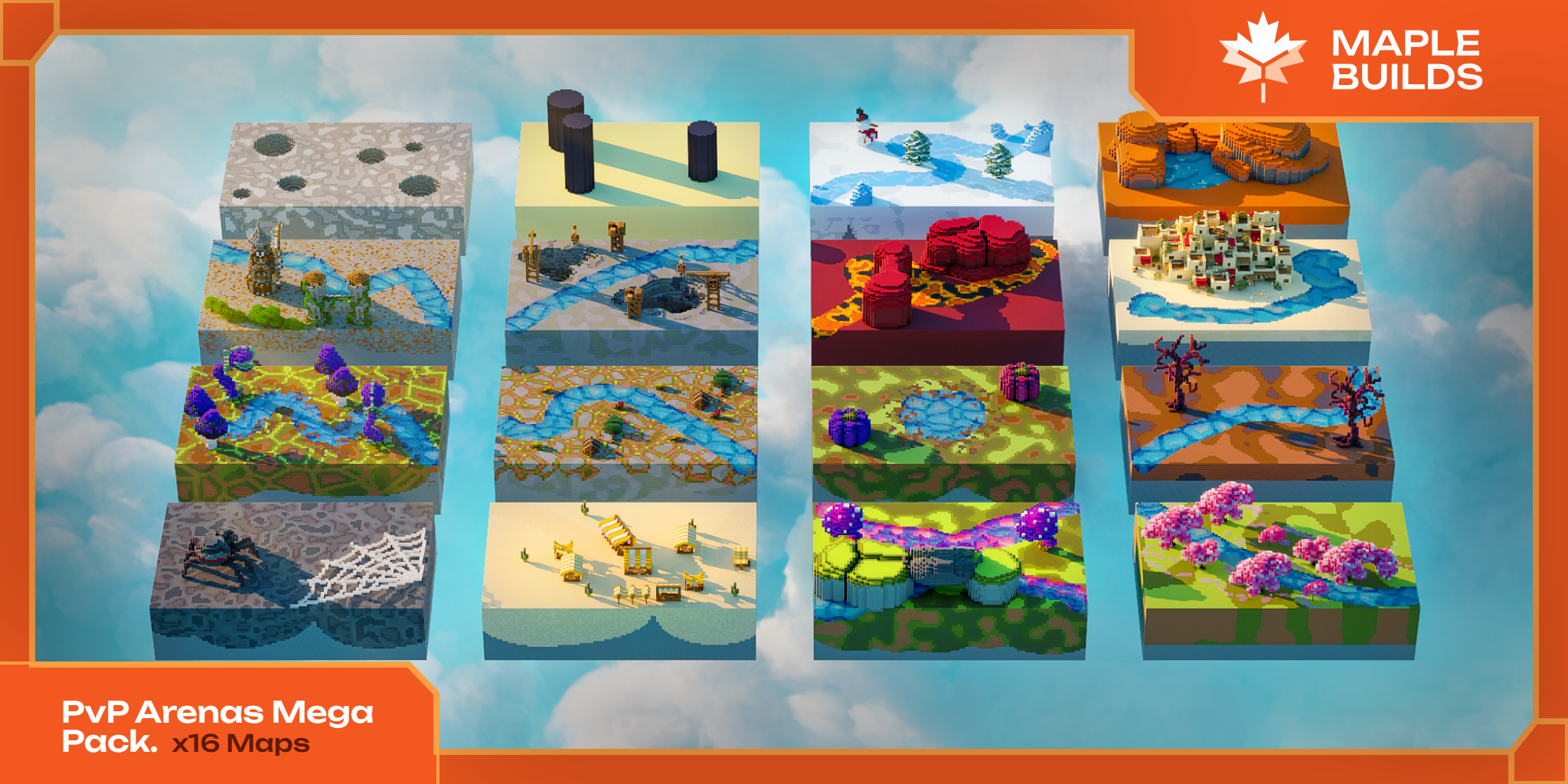
Two ways to load an arena, using a pack like this or your own build:
- Schematic: put the file matching your version in the WorldEdit or FAWE schematics folder, run
//schem load <name>, stand where you want it and run//paste. - World folder: place the folder in your server's root directory, rename it, then set
level-nameinserver.propertiesor run/mvimport <name> normalif you use Multiverse.
Either way, protect the arena afterwards. The original Duels supports WorldGuard, and Duels Optimised lists WorldGuard DuelZones, so you can stop players breaking the map or fighting outside matches.
Create the arena and set both spawn points
Stand in your arena and run the admin commands. These are the original Duels commands (permission duels.admin):
/duels create forest
/duels set forest 1
/duels set forest 2
/duels savekit sword
/duels addsign <money> sword
/duels set forest 1 saves your current position as the first player's spawn, so stand where player one should start. Move to the other side and set position 2. Then use /duels toggle forest to enable or disable the arena. /duels delete forest removes it.
Test first by going to each point with your admin tools. If you use AsDuels, take the wand with /ad wand and select the area in game. If you use JGJ52's plugin, select the area with the WorldEdit wand and follow its page.
Save a kit and tie it to a queue
- Fill your inventory and armour with exactly what duellists should get.
- Run
/duels savekit sword. Add-oto overwrite an existing kit. - Open the kit settings with
/duels options swordif your version has that menu. Some versions also have a/duels bindcommand to link kits and arenas.
With AsDuels, set up your gear and run /ad kit save with a kit name. Duels Optimised also gives each player a kit editor, so players can rearrange their own layout.
Add queue signs players can click
Place a sign, look at it and run /duels addsign <money> sword. The money value is the bet amount for that queue. Players right-click the sign to join the queue for that kit. To make a queue without a sign, the original plugin has /duels createqueue <money> <kit>. Players can also challenge someone directly with /duel <player>.
Put signs at your spawn or lobby in a visible place, one per kit, with the kit name on the first line. Our lobby design guide shows how to lay out a hub so players find them.
Reset the arena after each match
If players can place or break blocks, the arena will be wrecked after a few rounds. You have three choices:
- Use a kit with no block placing, such as plain sword or axe fights, and protect the map with WorldGuard.
- Use AsDuels, which cleans up blocks players placed and protects the original ones.
- Add a regeneration extension. Duels Optimised lists an arena regeneration add-on, and Arena Regen Extension for Duels Optimized is a third-party extension made by our team that regenerates arenas.

For how arena restoring works in general, with timers and speed settings, read our ArenaRegen guide.
Test before you open the queue
- Join with two accounts and queue for the same kit.
- Check that both players land on the right spawn and the countdown runs.
- Win a match, then check the kit is removed, the player returns to spawn and the arena is ready again.
- Try breaking blocks and leaving the arena to confirm your protection works.
- Make a backup before you open to the public.
Frequently asked questions
How do I make a duels server in Minecraft?
Install a duel plugin on Paper or Spigot, load a PvP arena, create it in the plugin and set two spawn points. Then save a kit and add a queue sign. Test with two accounts before opening to players.
Which free duels plugin should I use?
Duels Optimised is free and lists Java 1.14 to 26.3 on Paper, Purpur, Spigot and Folia, so it suits most current servers. The original Duels is also free but its listing tests up to 1.19. AsDuels suits a simple 1.21 setup.
How do I create a duel arena with /duels create?
Stand in the arena and run /duels create followed by a name. Then run /duels set with the name and 1, move to the other side and set 2. Use /duels toggle to enable or disable it. Check your plugin version's docs, as forks may differ.
How do I save a kit for duels?
Put the gear you want in your inventory and run /duels savekit with a kit name, adding -o to overwrite. In AsDuels the command is /ad kit save. Test it with a normal player account, not an admin.
How do I reset an arena after a duel?
Either use kits where players cannot place blocks and protect the map, or use a plugin that restores blocks. AsDuels cleans up player-placed blocks, and Duels Optimised has an arena regeneration add-on.